Pokémon card scanner
Trainer's PC is a Pokémon card scanner for iPhone. Hold your phone over a card and the app tells you which card it is, which release it's from (1st Edition, Unlimited, reverse holo, promo stamps and reprints) and what it's worth, usually in about a second. Tap + and it goes straight into your collection.
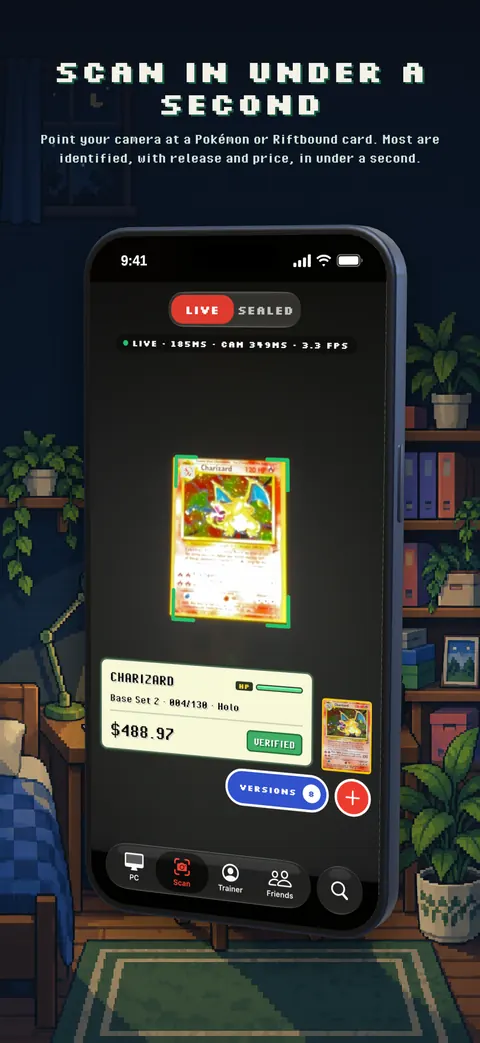
Scan a card in about a second
Open the Scan tab and point the camera at a card. There is no button to press: the scanner watches the camera live, recognizes the card as soon as it is in view and shows a result plate with the name, set, number, printing and price. Swap in the next card and the plate changes with it, so you can go through a stack quickly.
Each scanned card waits in a tray. When you are done, tap DEPOSIT and the whole stack goes into your PC, filed into boxes for you.
The exact printing, not just the name
Many Pokémon cards were printed more than once with the same artwork: Base Set and its reprints, 1st Edition and Unlimited, holo and reverse holo, prerelease and staff stamps, promo versions and Celebrations reprints. Their prices can differ by a lot, so a scanner that only knows the name is not much help.
Trainer's PC looks at the details that tell releases apart: the collector number, the 1st Edition stamp, set symbols and stamps, and differences in the printing itself. When it is sure, the release shows as VERIFIED. When two releases really do look identical in the photo, it says so and lets you pick from a short list instead of guessing. How the scanner works explains this in more detail.
Every era and language
The scanner covers Pokémon cards from 1999's Base Set to the newest sets, about 1,350 sets in all. It reads English and Japanese Pokémon cards from their artwork, and also recognizes Chinese, Korean, French, German, Italian and Spanish prints: it finds the card, then reads the printed language to pick the right version.
Sealed product scans too: switch the scanner to SEALED and scan the barcode on a booster box, Elite Trainer Box, tin or pack.
Tips for a fast, accurate scan
- Lay the card on a plain, darker surface and hold the phone above it so the card fills most of the screen.
- Even light helps. If glare covers the picture, tilt the card a little. Sleeves and top loaders are fine.
- Hold still for a moment. The card is confirmed first, then the exact release.
- If the plate says PICK VERSION or NOT SURE, tap it and choose the right printing from the list.
- If it says MOVE BACK, the corners of the card are off the screen.
Cards upside down, in sleeves or held at a slight angle are fine. If something will not scan, use the Search tab to find it by name and number.
What happens after a scan
- Price: the market price for the exact printing and condition, updated daily. Open the card for its price history, recent sales and graded values. See Pokémon card values.
- Your PC: deposited cards are filed into boxes of 30, in your own naming style. See the collection tracker.
- Details: set condition (Near Mint to Damaged), grade (PSA, CGC, BGS and more), quantity, what you paid and notes before depositing.
Questions
Is there a free Pokémon card scanner?
Yes. Trainer's PC is free to download, and the free plan includes 20 scans a week (each card counts once a week). Searching and adding cards by hand is unlimited. Trainer's PC Pro adds unlimited scans.
Can it tell 1st Edition from Unlimited?
Yes. It checks the scan for the 1st Edition stamp and compares the card against each release that shares the artwork. If the stamp is hidden by glare or a finger, it asks you to pick rather than guess Unlimited.
Does it scan Japanese Pokémon cards?
Yes. Japanese cards have their own catalog with pictures and prices. See the Japanese Pokémon card scanner.
Does it work without internet?
No. Cards are recognized on our servers, so scanning needs a data or Wi-Fi connection. Your collection, boxes and prices load from the same account on your phone and on the web.
Can it scan graded cards in slabs?
Scan or search the card, then set the grading company and grade when you add it. The app values graded cards with graded sales for that grade.
Get Trainer's PC free on iPhone. Android is coming to Google Play. Already a trainer? Open your PC on the web.