How the card scanner works
Trainer's PC recognizes a card in a few steps that run while you hold the phone over it: it finds the card in the camera picture, matches the artwork against a catalog of about 144,000 cards, then checks the small details that tell one release from another. The whole thing usually takes about a second.
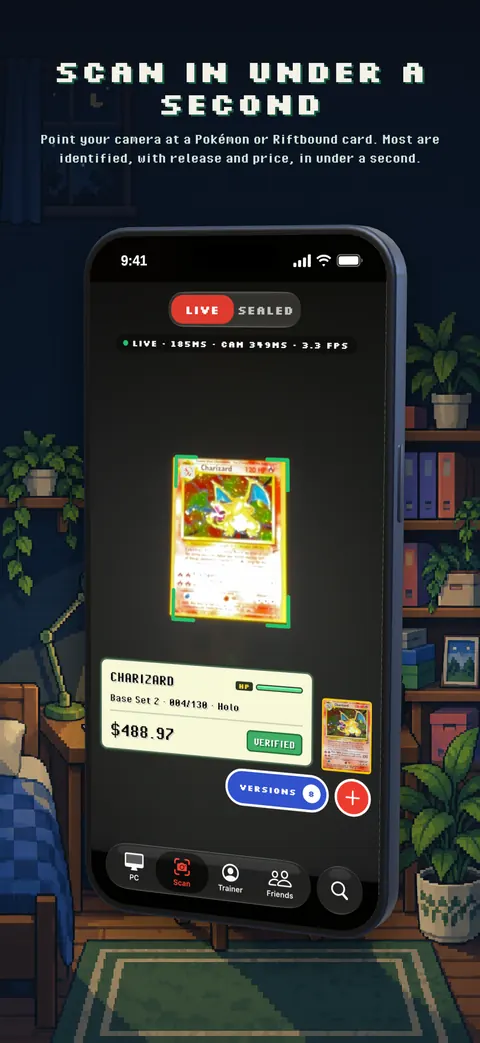
1. Finding the card
The app streams the camera to our recognition servers a few times a second. Each frame is checked for a card: its outline is found and straightened out, even if the card is tilted, upside down, in a sleeve or partly covered by a finger. Frames are only sent while you are on the scanner, and when you hold a card still the app slows down and sends only what it needs.
2. Matching the artwork
The straightened card is compared with a visual index of every card in the catalog. This narrows tens of thousands of cards down to a handful of candidates with the same or similar artwork in a fraction of a second. The scanner is trained on photos taken the way people really scan, with glare, sleeves, shadows, holo shine and low light, so it holds up away from perfect lighting.
3. Picking the exact release
The same artwork is often printed several times. To choose between them, the scanner looks at what actually differs: it reads the collector number, checks for a 1st Edition stamp and other stamps, and compares the printing itself where the releases differ. It also reads the printed language, which is how Chinese, Korean and European cards are told apart from English and Japanese ones.
Only when the evidence is clear does the result say VERIFIED. If the card is far from the camera, the app may take one sharper photo to read the small print.
4. Being honest when it is not sure
Some releases are printed identically, and some differences are hidden by glare. Instead of guessing, the scanner says PICK VERSION and shows the candidates, best match first, so the card in your PC is always the one in your hand. It would rather ask than be confidently wrong.
Prices and your PC
Once the card is known, its price comes from the daily market data for that printing (see Pokémon card values). Deposited cards are filed into the boxes of your PC (see the collection tracker).
Privacy
Camera frames are used only to identify the card and are not kept, apart from a small sample kept for a few days while we troubleshoot recognition. The camera is never used unless you open the scanner. There are no ads and no tracking. Details are in the privacy policy.
Get Trainer's PC free on iPhone. Android is coming to Google Play. Already a trainer? Open your PC on the web.