Frequently asked questions
Trainer's PC is an iPhone app that scans Pokémon and Riftbound cards, prices them and keeps your collection in boxes. Here are the questions collectors ask most. Anything else, e-mail support@trainerpc.com.
What is Trainer's PC?
An app for Pokémon and Riftbound card collectors: a card scanner, price checker and collection tracker in one. Cards are kept in boxes in your own PC, like the storage PC in the classic games. See About.
Which cards can it scan?
Pokémon cards in English, Japanese, Chinese, Korean, French, German, Italian and Spanish, Pokémon sealed product, and Riftbound cards and sealed product: about 144,000 items in all. Other games (Magic, Yu-Gi-Oh!, One Piece, Lorcana, sports cards) are not supported.
How fast and accurate is the scanner?
Most cards are recognized in about a second. The scanner shows VERIFIED only when it is confident about the exact release, and asks you to pick when two printings look identical, so mistakes are rare. See how it works.
Is it free?
Yes, to download and use. The free plan has 20 scans a week, 3 boxes and the last month of price history. Searching and adding cards by hand, prices, trading and chat are always free. There are no ads.
What does Trainer's PC Pro include?
Unlimited scans and boxes, smart sorting, full price history and collection value over time, custom box wallpapers, your real trainer level and a Pro badge. Pro is $4.99 a month or $39.99 a year, with a 7-day free trial on the yearly plan. Cancel any time in your App Store settings.
Is there an Android version?
Android is coming to Google Play. In the meantime you can view and organize your PC on the web at trainerpc.com/pc.
Does it work on iPad?
Yes. Trainer's PC runs on iPad from the App Store.
Can I use it on a computer?
Yes. Sign in at trainerpc.com/pc to see your boxes, drag cards around and share your collection. Scanning needs the phone app.
Does it scan Japanese cards?
Yes, with their own catalog and prices. See the Japanese Pokémon card scanner.
Where do the prices come from?
Daily market data: TCGplayer market prices, recent sold listings and Cardmarket for European prints, plus graded sales for slabs. See card values.
Can I import my collection from Collectr or a spreadsheet?
Yes. Import a CSV export from Collectr or TCGplayer on the Trainer tab, and export your collection as CSV whenever you like.
How does trading work?
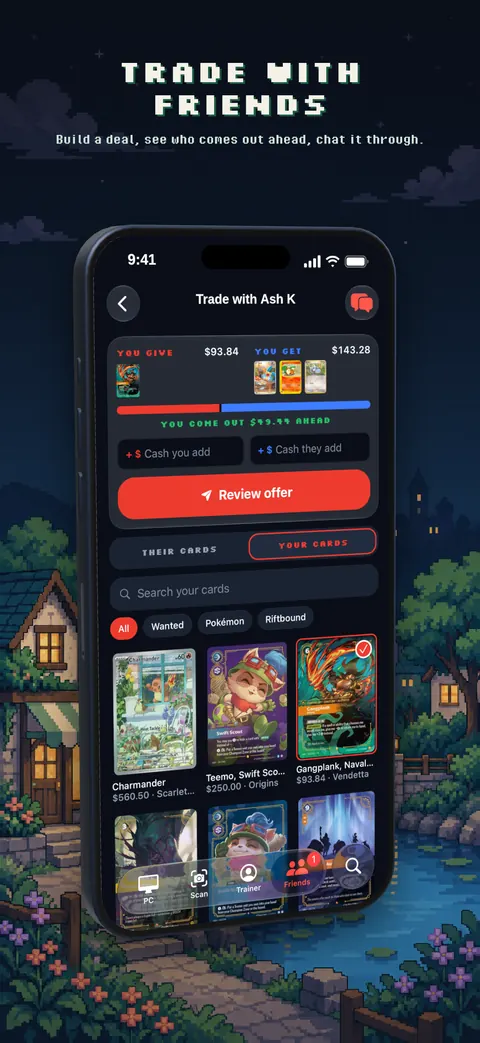
Add a friend by QR code, friend link or name, then build a trade from both PCs. The app shows the value of each side and who comes out ahead. Cards move once both trainers confirm the swap. You can chat, report and block in the app.
Is my collection private?
You choose. Share your whole PC, single boxes or your trainer card with a link, let only friends see your PC, or keep it private. You can delete your account and everything in it from the app at any time.
Does scanning need an internet connection?
Yes. Cards are recognized on our servers, which keeps the app small and lets new sets work without an update.
Is Trainer's PC official?
No. It's an independent app made by a fan and is not affiliated with or endorsed by Nintendo, The Pokémon Company, Creatures, GAME FREAK or Riot Games.
Get Trainer's PC free on iPhone. Android is coming to Google Play. Already a trainer? Open your PC on the web.